Chat & overlays
How to put multistream chat on your stream in OBS
A browser source that shows your merged chat on stream, styled to stay readable over video.
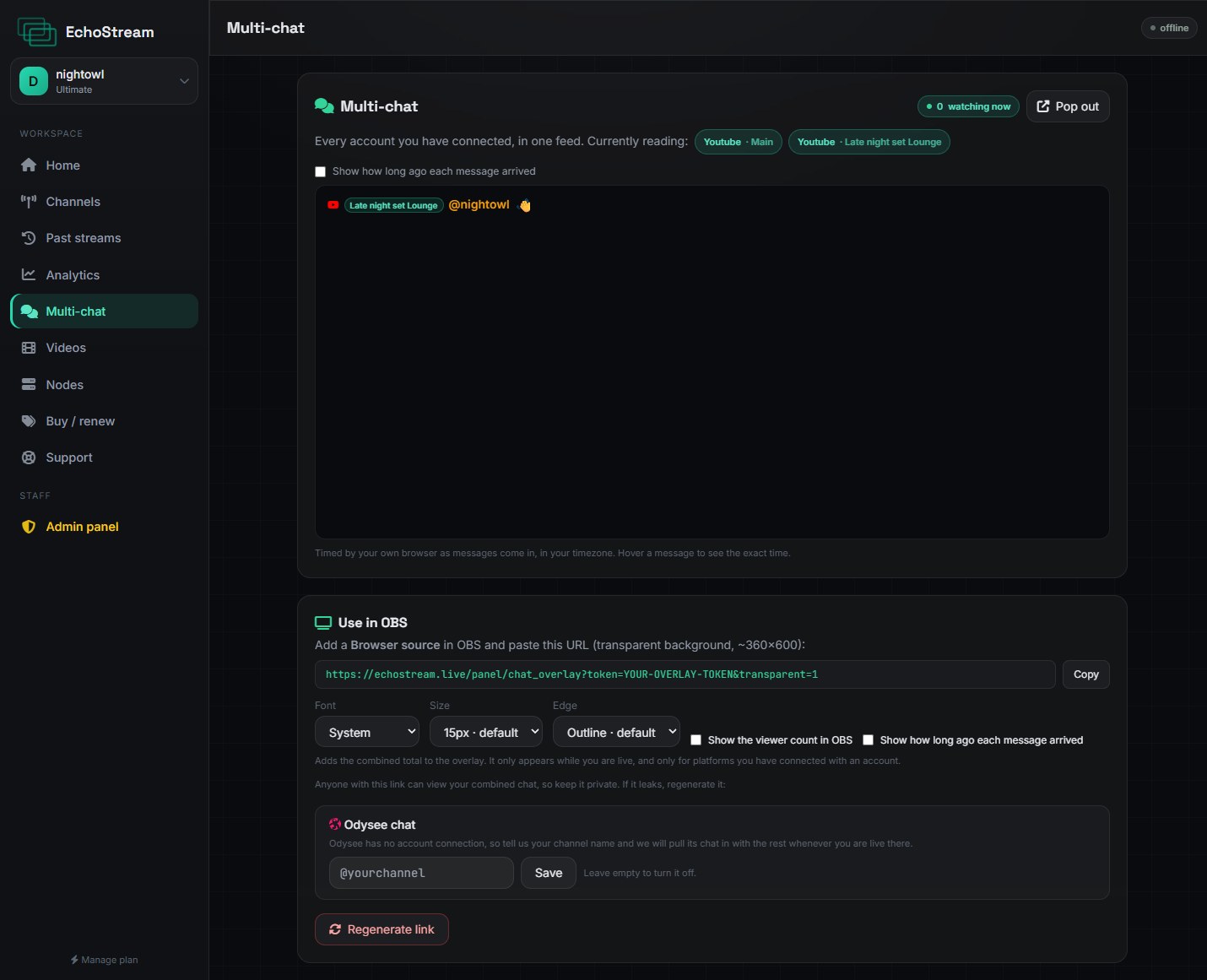
- On the Chat page, copy your overlay link.
- In OBS add a Browser source.
- Paste the link into URL.
- Set the size, around 360 × 600 to start.
Text is white and bold with a dark outline by default, which holds up over bright and busy footage where a plain drop shadow disappears.
Changing how it looks
The controls beside the link build the URL for you. The whole appearance lives in the link, so changing your mind means pasting a different URL, with nothing stored to get out of sync.
| Option | Does | Default |
|---|---|---|
transparent | Removes the background so only the text shows | Off |
font | System, rounded, condensed, serif or mono | System |
size | Text size in pixels | 15 |
edge | soft swaps the outline for the older soft shadow | Outline |
viewers | Adds a viewer count above the chat | Off |
time | Shows how long ago each message arrived | Off |
https://echostream.live/panel/chat_overlay?token=…&transparent=1&size=20
Treat the link like a key
Anyone with the overlay link can read your chat. Do not show the URL bar on stream, and do not post the link publicly.
Tip
Want the viewer count somewhere else in your scene instead of stacked above chat? Use the separate viewer count overlay.